What to Check Before Choosing a Bitcoin Lightning Wallet
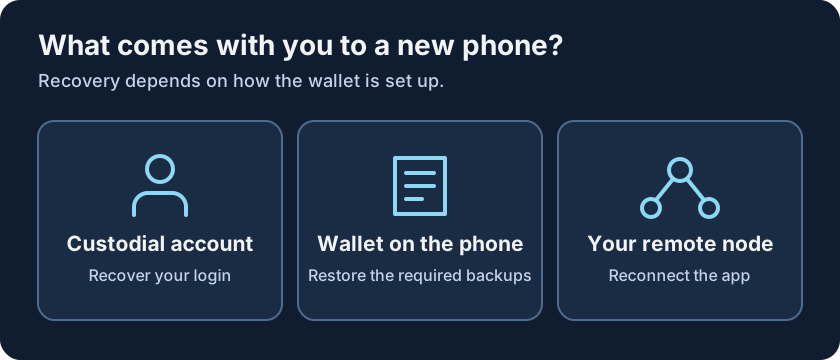
Say you drop your phone and the screen goes black. Getting the wallet icon onto a replacement is the easy part. Can the new installation still spend your bitcoin? For an account-based service, whether it’s a streaming subscription or an online casino like lamalucky, you’d usually start by signing back in. A Lightning wallet may work that way too, but it might instead ask for a recovery phrase, a channel backup, or access to a node you run. The time to find out which is before there’s money in it.
What the wallet app manages
A Bitcoin Lightning wallet app sends and receives bitcoin through payment channels. There’s no separate Lightning coin to buy. When a payment goes through a channel, the two parties update the amounts they can claim rather than recording that payment on the blockchain. The app can run its own node, connect to one you run elsewhere, or let a service handle payments for you. You probably won’t learn which from the Send button.
Look at what happens when you first open the app. Does it ask you to make an account, connect to an existing node, or create a new wallet? Two apps that scan the same invoice can have very different answers. Those differences are worth checking before you get to the part covered by our payment routing guide: what happens after you press Pay.
Who can move the bitcoin
When a service holds the keys, the number in the app represents the balance it keeps for you. With self-custody, you control the keys. That doesn’t rule out help from a provider. An app might ask one to open channels or store an encrypted backup without handing it control of your bitcoin. The question to put to the documentation is narrower: which of those tasks can you still do if the provider isn’t available?
| Setup | Who controls the keys | What to check before funding |
|---|---|---|
| Custodial account | The service | Login recovery and withdrawals |
| Self-custody with a provider | You | What the provider handles and how to restore |
| Phone connected to your own node | You, through your node setup | Whether you can reconnect from a new phone |
| Wallet with a node on the phone | You | How the app recovers channel funds |
A node that runs on your phone can also use a provider, so don’t read the last two rows as opposites. If you only look up one thing before installing, make it the instructions for a lost phone. Some recovery steps are possible with the old device in your hand and impossible once it’s gone.
Who can spend the bitcoin and who can help you recover it are two different questions.
What the first incoming payment can cost
Getting an invoice on screen doesn’t mean the wallet has room to receive the payment. That room, called inbound liquidity, comes from funds available on the other side of its channels. Some apps can arrange a new channel when you receive; others expect one to be ready. If the app charges a fixed fee for opening it, that fee can take a noticeable bite out of a small first transfer. The wallet may also set a minimum.
If you’re wondering how to get a Bitcoin Lightning wallet, use the developer’s official download instructions. Then look at the Receive screen and fee schedule together. The download page tells you how to install it; the fee schedule tells you what might happen when someone tries to send you bitcoin. Look for these details:
- The minimum amount the wallet can receive.
- Any fee for opening a channel or adding inbound liquidity.
- Whether the quote is a fixed charge or depends on the amount.
- Whether the app needs to stay open to receive.
- Whether the balance can be withdrawn on-chain and at what cost.
What a backup actually restores
A recovery phrase gives a compatible wallet a way to recreate keys. By itself, it may not tell the app what happened in your Lightning channels before the phone stopped working. Look for the wallet’s specific restore procedure, including any encrypted backup it keeps with a service. LND is one example where a static channel backup can help recover funds by asking peers to close the channels. The result is on-chain bitcoin, not a revived set of channels.
| Item | What it can help with | What it is not |
|---|---|---|
| Account recovery method | Getting back into a custodial account | Control of the service’s keys |
| Recovery phrase | Recreating keys in a compatible setup | A universal Lightning channel backup |
| Channel backup | Recovering funds by the app’s documented method | A guarantee that channels reopen |
| Payment history | Finding old amounts and references | A way to spend or recover funds |
A phone backup might bring back the wallet’s name or payment history. An old receipt is useful when you need to look up an amount, but it won’t help you spend the remaining balance. There’s a separate question about the information held by apps and providers, covered in our wallet privacy chapter.
Restoring access to funds can mean getting them back on-chain, not picking up with the same open channels.
Before you trade in the old phone
When you upgrade on purpose, you have something you won’t have after a loss: a working original. Keep it intact while you check how the wallet expects you to move. If it runs a node locally, don’t try opening two copies of that node as an experiment. Use the documented migration procedure rather than treating the move as disaster recovery.
- Check the instructions for the exact app and setup you use.
- Find out which recovery items must live somewhere other than the old phone.
- Make sure you still have any login or second factor the move requires.
- Follow the wallet’s migration sequence and verify that the new setup works.
- Erase the old phone only after confirming access to the funds.
Try writing down what you would need if the phone disappeared tonight, without writing the secrets themselves in that note. Can you identify who controls the funds, where the recovery material lives, and what you’d get back after a restore? If the answer is “I think the app does it,” look up the missing step while you still have the old setup. That’s a better test of a wallet than a tidy balance screen.